Finding Module Address through PEB
Introduction
Generally, programs resolve specific module addresses (such as kernel32.dll) by calling windows api like GetModuleHandle() or through native api like NtQuerySystemInformation. However, this leaves alot of traces and can be easily detected by EDRs or by simplying analysing the Import Address Table (IAT) in the PE strucuture of the binary program. To stay stealthy, malware devs resolve module addresses through PEB walk.
What is PEB?
When we execute a program, _TEB and _PEB structures are initalised by the kernel.
- TEB (Thread Environment Block): A Structure that stores information specific to a thread
1
2
3
4
5
6
7
8
9
10
11
12
typedef struct _TEB {
  PVOID Reserved1[12];
  PPEB  ProcessEnvironmentBlock;
  PVOID Reserved2[399];
  BYTE  Reserved3[1952];
  PVOID TlsSlots[64];
  BYTE  Reserved4[8];
  PVOID Reserved5[26];
  PVOID ReservedForOle;
  PVOID Reserved6[4];
  PVOID TlsExpansionSlots;
} TEB, *PTEB;
- PEB (Process Environment Block): A structure that contains information about the entire process, including loaded modules.
1
2
3
4
5
6
7
8
9
10
11
12
13
14
15
16
17
18
19
20
21
typedef struct _PEB {
  BYTE                          Reserved1[2];
  BYTE                          BeingDebugged;
  BYTE                          Reserved2[1];
  PVOID                         Reserved3[2];
  PPEB_LDR_DATA                 Ldr;
  PRTL_USER_PROCESS_PARAMETERS  ProcessParameters;
  PVOID                         Reserved4[3];
  PVOID                         AtlThunkSListPtr;
  PVOID                         Reserved5;
  ULONG                         Reserved6;
  PVOID                         Reserved7;
  ULONG                         Reserved8;
  ULONG                         AtlThunkSListPtr32;
  PVOID                         Reserved9[45];
  BYTE                          Reserved10[96];
  PPS_POST_PROCESS_INIT_ROUTINE PostProcessInitRoutine;
  BYTE                          Reserved11[128];
  PVOID                         Reserved12[1];
  ULONG                         SessionId;
} PEB, *PPEB;
Viewing Structures with WinDbg
Let’s verify these structures by opening a process in WinDbg
(Please note that the below images will only show the relevant fields and not all fields)
1
dt _teb
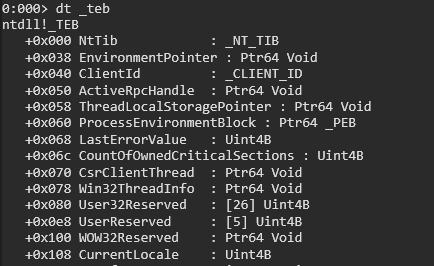
This command displays the _TEB structure. Take note of ProcessEnvironmentBlock field of which points to the _PEB. In a 64 bit architecture, the offset is 0x060 and In 32 bit, it is 0x030.
1
dt _PEB
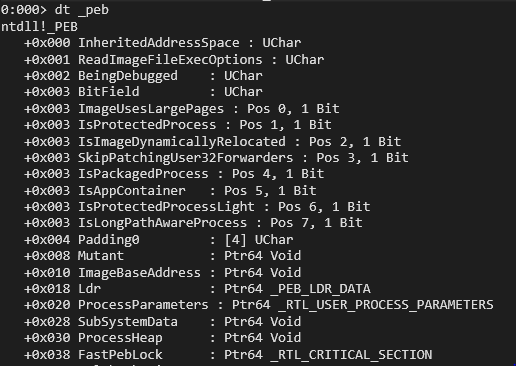
This command display the structure of _PEB which has Ldr field which points to _PEB_LDR_DATA structure.
1
dt _PEB_LDR_DATA
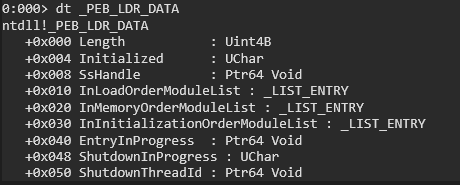
The _PEB_LDR_DATA structure contains InLoadOrderModuleList, InMemoryOrderModuleList, InInitializationOrderModuleList. We will focus on InMemoryOrderModuleList, which the head of a doubly linked list that contains the loaded modules of the process. Each item in the list is a pointer to an LDR_DATA_TABLE_ENTRY structure.
1
dt _LDR_DATA_TABLE_ENTRY
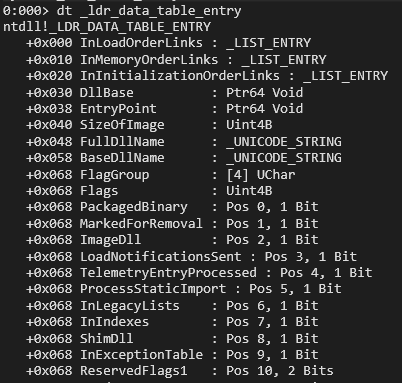
This command display the stucture of _LDR_DATA_TABLE_ENTRY which is a linked list. This structure holds DllBase(the base address of the loaded DLL) and the FullDllName, BaseDllName. These are teh values we need for a PEB walk. Take note of InMemoryOrderLinks field’s offset at 0x010. We will come back to it later.
PEB Walk in WinDBG
1
! _peb
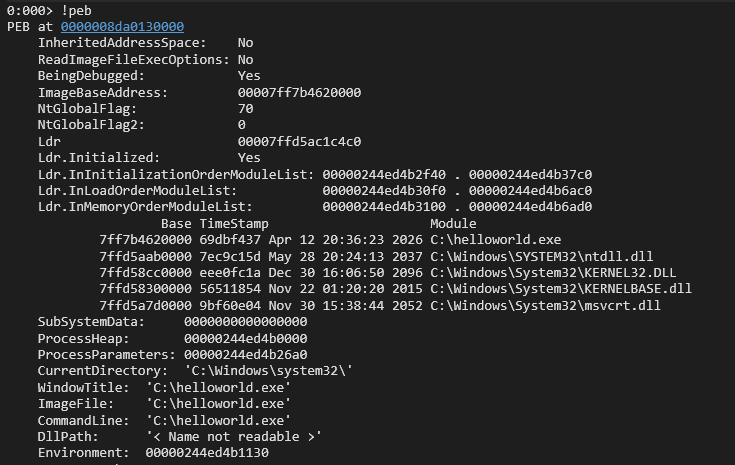
This command will display the current PEB information of the process running. Take note of loaded Dlls. At this moment, we are only interested in Ldr address, which is 00007ffd5ac1c4c0.
1
dt _PEB_LDR_DATA 00007ffd5ac1c4c0
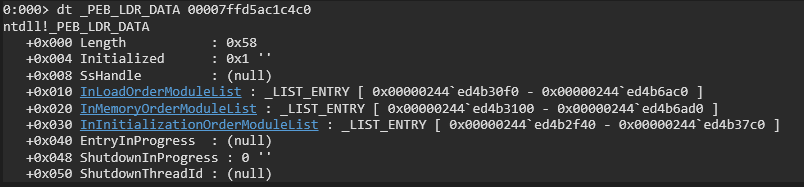
This display the _PEB_LDR_DATA of our current process. What intersts us is the InMemoryOrderModuleList address. This address points directly to the InMemoryOrderLinks field inside the _LDR_DATA_TABLE_ENTRY structure.
To view the very start of _LDR_DATA_TABLE_ENTRY structure properly, we can take the address 0x00000244ed3 and substract by 0x10 (the offset of InMemoryOrderLinks, see structure _LDR_DATA_TABLE_ENTRY for more details)
1
dt _LDR_DATA_TABLE_ENTRY 0x00000244ed3-10
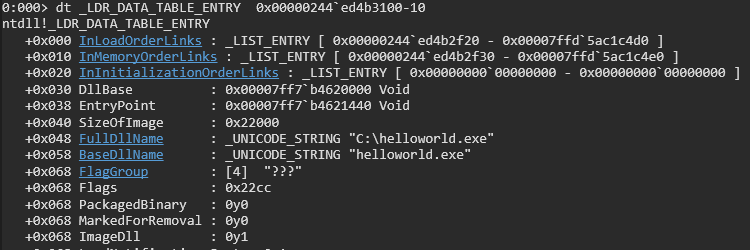
Perfect, now we can see FullDllName, BaseDllName and DllBase which is what we want. Currently the BaseDllName is helloworld.exe which is the executable of our process.
We will continue to navigate Flink pointer inside InMemoryOrderLinks and subtract 0x10 to get the loaded modules.
1
dt _LDR_DATA_TABLE_ENTRY 0x00000244ed4b2f30-10
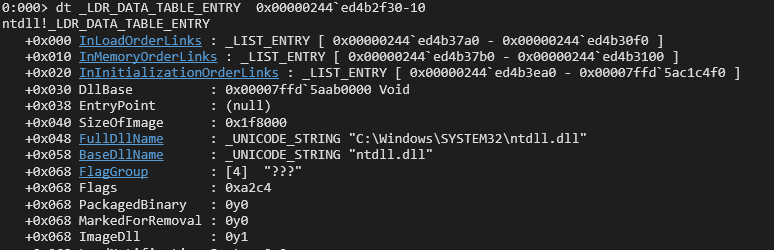
Now the BaseDllName is ntdll.dll.
1
dt _LDR_DATA_TABLE_ENTRY 0x00000244ed4b37b0-10
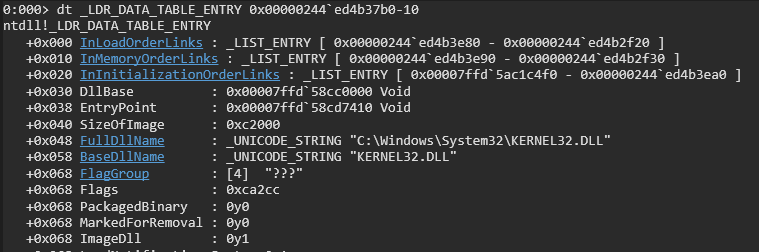
Next the BaseDllname is kernel32.dll which is our generally the common goal for malwares.
1
dt _LDR_DATA_TABLE_ENTRY 0x00000244ed4b3e90-10
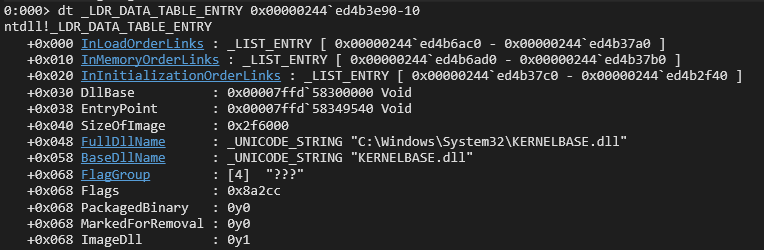
Continuing the peb walk, we get BaseDllName kernelbase.dll
1
dt _LDR_DATA_TABLE_ENTRY 0x00000244ed4b6ad0-10
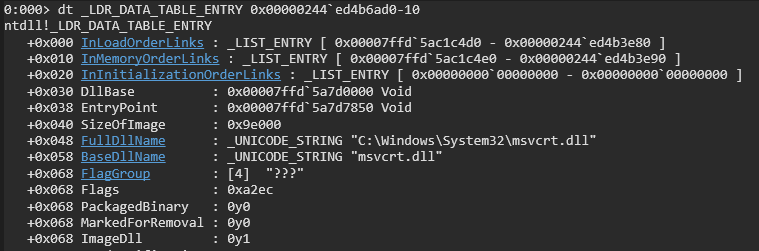
At the end we get, msvcrt.dll
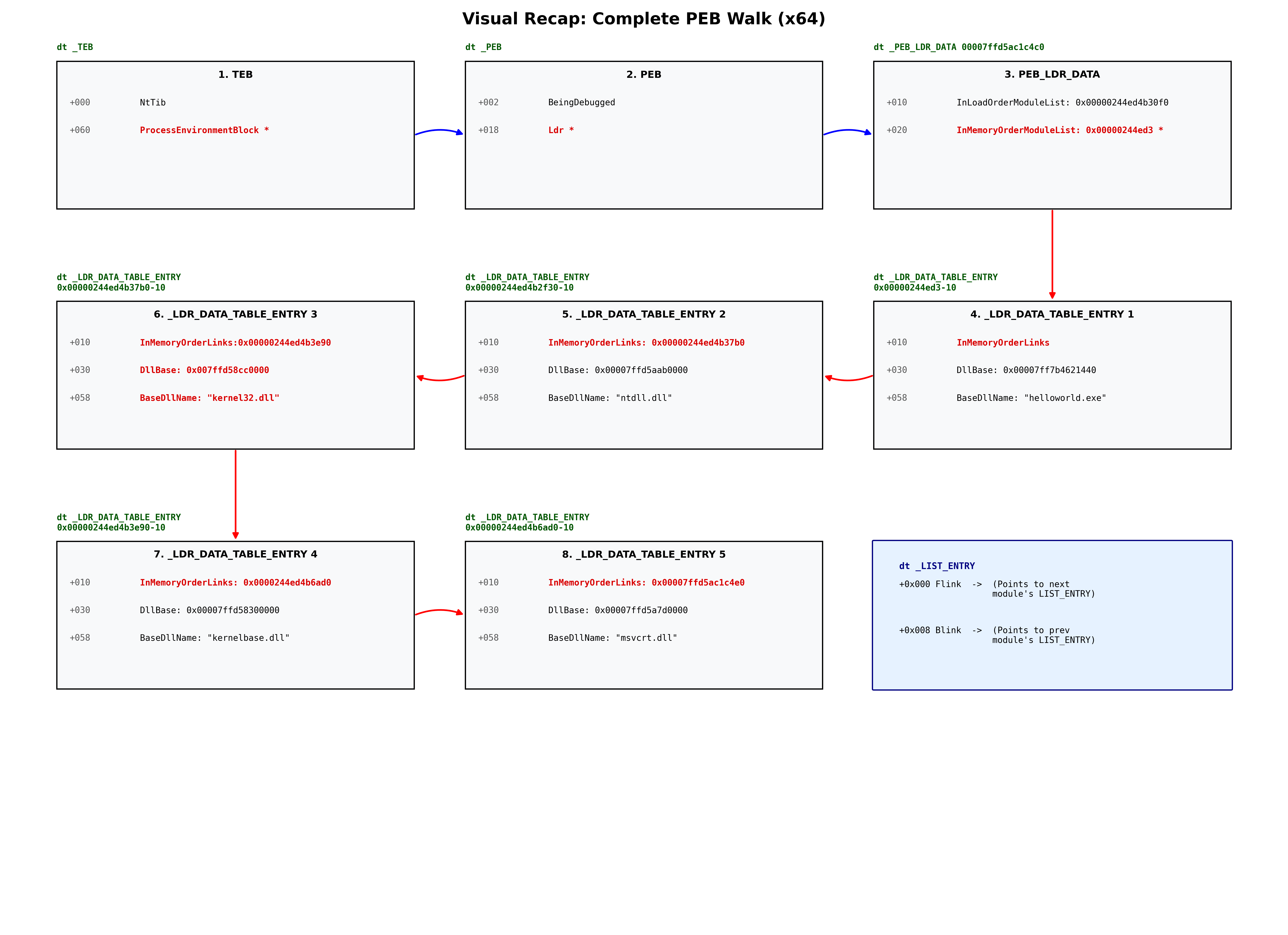
Visual Recap
Resources
- https://learn.microsoft.com/en-us/windows/win32/api/libloaderapi/nf-libloaderapi-getprocaddress
- https://learn.microsoft.com/de-de/windows/win32/api/winternl/nf-winternl-ntquerysysteminformation
- https://learn.microsoft.com/en-us/windows/win32/api/winternl/ns-winternl-teb
- https://learn.microsoft.com/en-us/windows/win32/api/winternl/ns-winternl-peb
- https://learn.microsoft.com/en-us/windows/win32/api/winternl/ns-winternl-peb_ldr_data
- https://learn.microsoft.com/en-us/windows-hardware/drivers/debugger/
- https://github.com/cocomelonc/mdmz_book/blob/main/mdmz2/11-windows-shellcoding-2.md
- https://fareedfauzi.github.io/2024/07/13/PEB-Walk.html